Blog/Article
Kubernetes on bare metal without the setup hell
Choosing the right compute for your workload
Most Kubernetes deployments run on virtual machines, and that's the right call for the vast majority of workloads. VMs give you flexibility, fast provisioning, and cost efficiency that's hard to beat for general-purpose services.
But there's a class of workload where the virtualization layer becomes a constraint rather than a convenience. When your application demands deterministic latency, maximum throughput, or guaranteed access to hardware resources (CPUs, GPUs, network interfaces), every abstraction layer between your code and the physical server is a liability.
That's where bare metal Kubernetes comes in. Your pods run directly on dedicated hardware. No resource contention with other tenants, no hypervisor scheduling overhead, no surprises. Full access to the machine, with standard Kubernetes on top.
The reason teams don't run K8s on bare metal by default isn't the hardware; it's the operational cost of cluster setup. Bootstrapping a control plane, configuring etcd, joining workers, setting up load balancing, it's a multi-day project before you can ship a single workload. Latitude Kubernetes Service (LKS) removes that entirely.
WHAT LKS IS
Kubernetes on dedicated bare metal, with automated provisioning. Built for workloads where performance, isolation, and hardware access are first-class requirements.
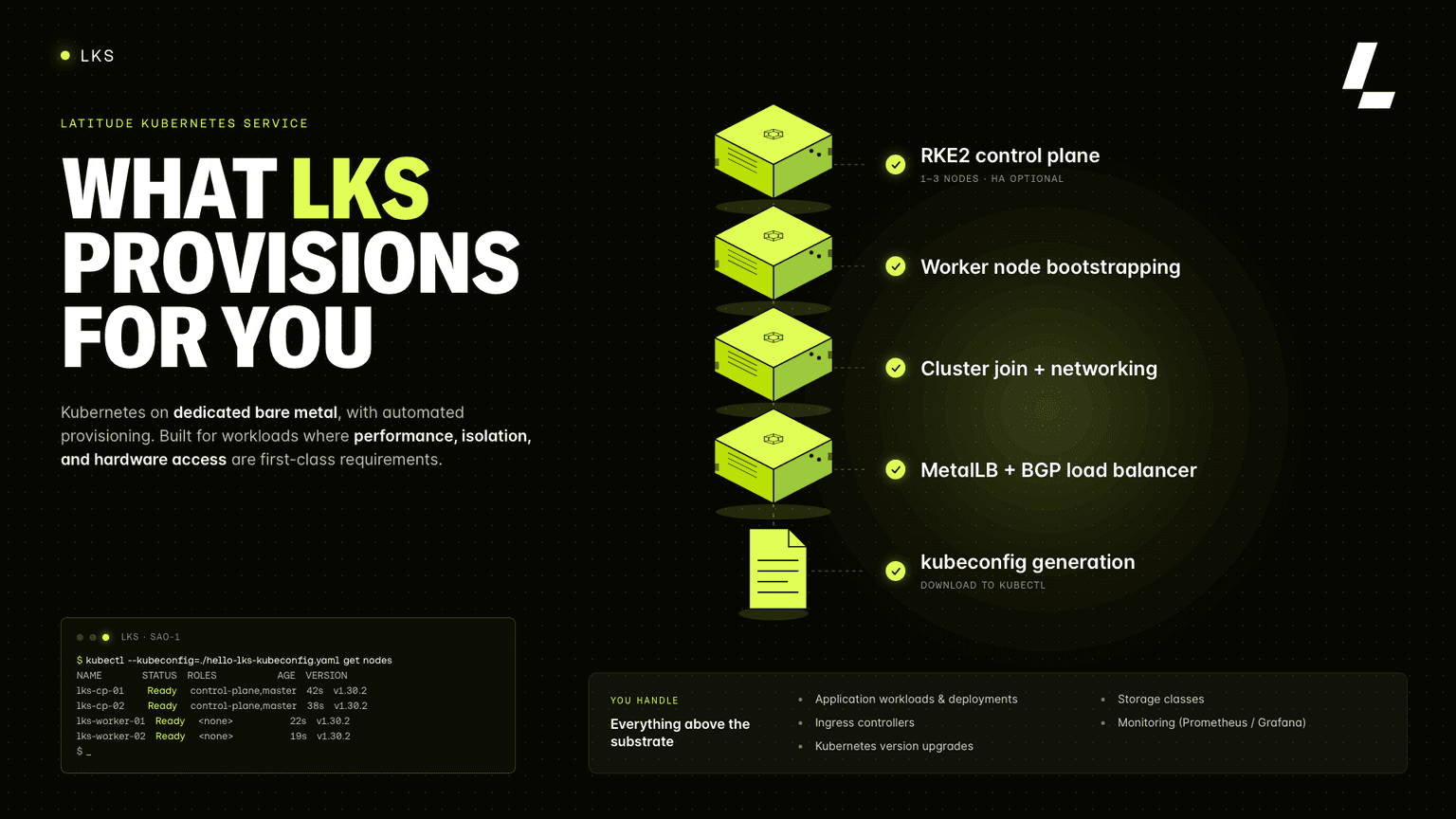
Deploy your first workload now and experience Kubernetes on bare metal without the usual complexity
Why RKE2
It addresses the operational pain points of vanilla kubeadm setups while remaining 100% standard Kubernetes. A few things that matter in practice:
etcd is embedded. No external etcd cluster to manage. State is colocated with the control plane nodes.
TLS bootstrapping is automated. Node certificates are issued and rotated automatically.
Calico for network policy. Predictable behavior, no surprise interoperability issues.
You interact with LKS clusters the same way you'd interact with any other Kubernetes cluster. kubectl, helm, k9s, everything works.
Built-in load balancing with MetalLB + BGP
Load balancing is the part of bare metal Kubernetes that usually breaks. In cloud environments, type: LoadBalancer services get an external IP automatically because the cloud provider's controller provisions one.
Every LKS cluster ships with MetalLB pre-configured and announcing IP addresses via BGP. When you create a LoadBalancer service, you get a real external IP assigned automatically, announced to the network, and ready to receive traffic. No annotations, no manual IP pool management, no hacks.
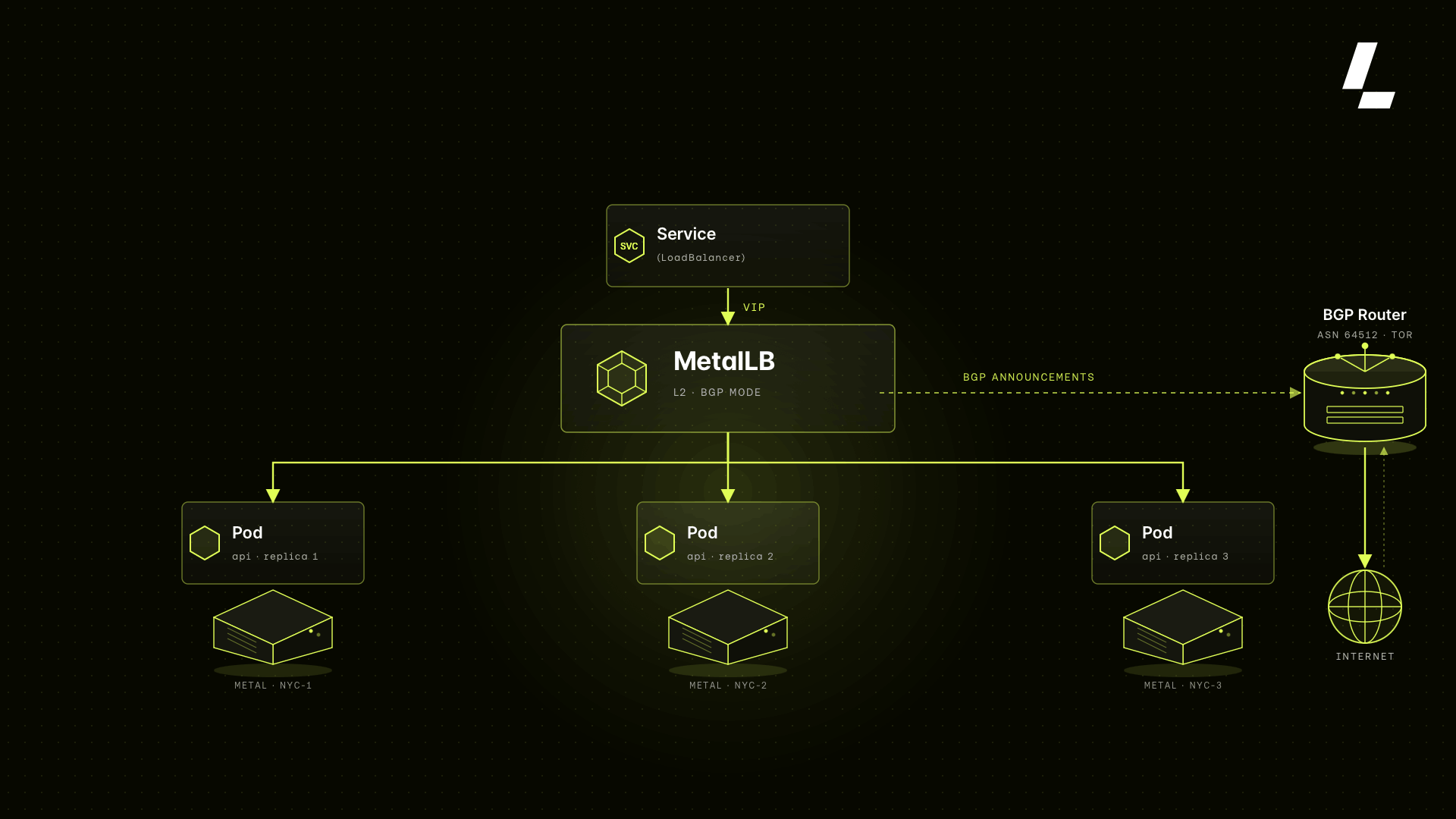
BGP (Border Gateway Protocol) is what makes this reliable at scale. Instead of ARP-based announcements that don't survive routing hops, BGP peering with the upstream router ensures your external IPs are properly advertised to the network and fail over correctly when a node goes down.
You can also interact with clusters programmatically via the Latitude.sh API to create, scale, upgrade, and delete clusters without touching the dashboard.
Running a real multi-service workload
So let’s deploy something real: Hermes 4 and Qwen 3.6 running side by side from a single bare-metal node.
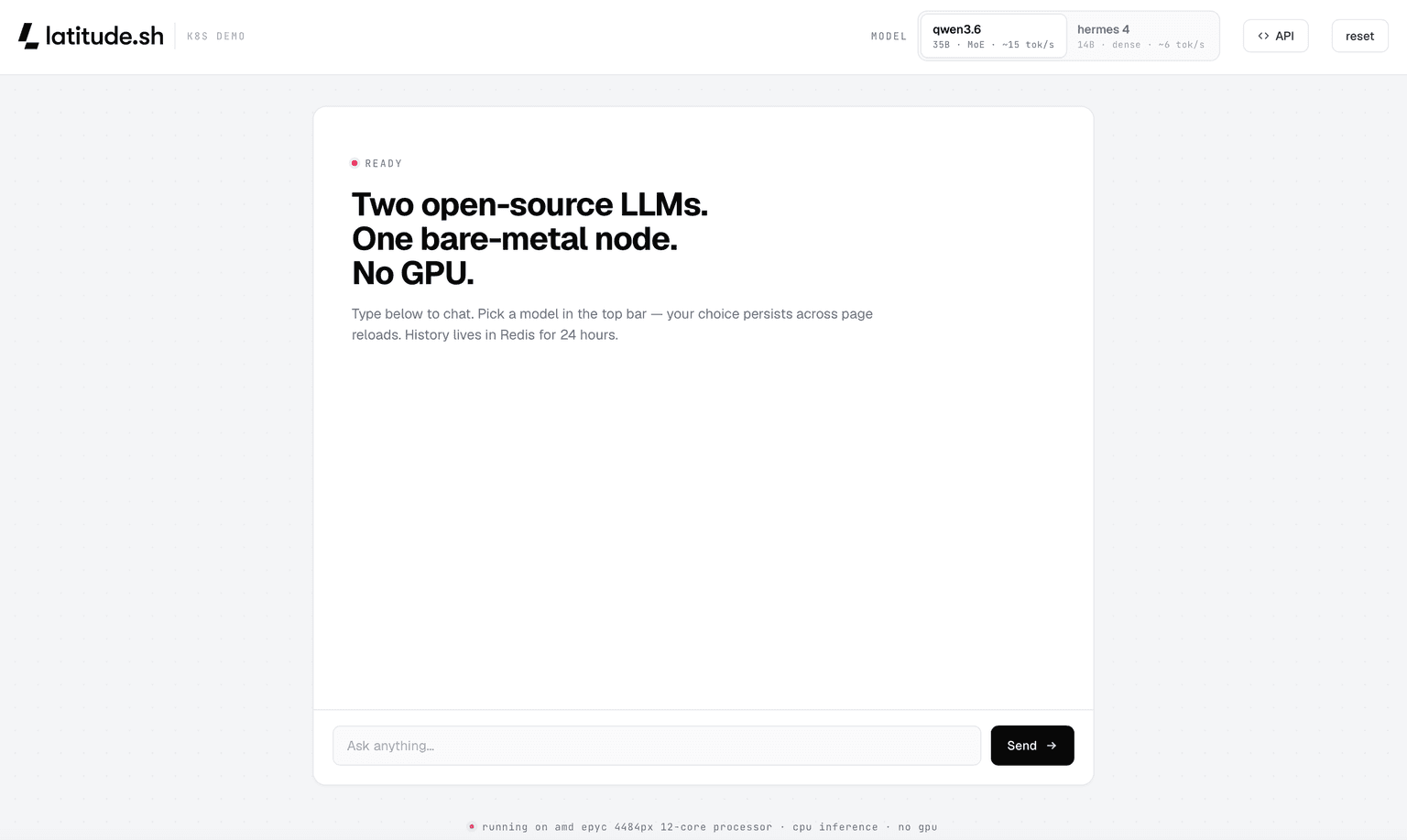
Want to see what modern CPU inference on bare metal actually feels like? Try the source code and switch between Hermes and Qwen in real time.
Scaling and upgrading
Cluster scaling is available from the dashboard and via API. You can add or remove worker nodes at any time. The Control Plane can be scaled from 1 node (non-HA; fine for dev/staging) to 3 nodes (HA; recommended for production workloads).
Category | Details |
|---|---|
CONTROL PLANE | 1-3 nodes |
WORKER NODES | 0-10 nodes |
K8S UPGRADES | API or dashboard |
BGP | MetalLB included |
Kubernetes version upgrades are available from the cluster settings. You can upgrade via the dashboard or trigger them through the API as part of your automated infra pipeline.
The right setup for you
As always, the right infrastructure depends on what you're running. Here's where bare metal Kubernetes tends to pull ahead of virtualized alternatives:
Blockchain validators and node operators: Validator nodes require deterministic CPU scheduling and consistent latency windows. A missed slot means missed rewards. Bare metal gives you guaranteed hardware access with no competing workloads on the same physical host.
GPU inference and ML serving: Inference workloads need full access to GPU hardware, NUMA topology, and PCIe bandwidth. Virtualization layers complicate driver access and add latency that compounds at scale.
High-frequency APIs and real-time backends: Game servers, trading systems, and multiplayer backends care about p99 latency, not just averages. Dedicated hardware means consistent tail latency, not probabilistic.
Platform engineering teams: Teams building internal developer platforms often want raw Kubernetes primitives, full control, no cloud provider abstractions, and predictable unit economics for chargeback modeling.
Compute-heavy data pipelines: Batch workloads that max out CPU and memory benefit from full hardware access. When you're buying dedicated capacity anyway, bare metal often offers better price-performance than equivalently sized VMs.
Spoilers: GPU support is coming!
What's coming next
In the near future, we're publishing deep dives on:
How MetalLB and BGP work under the hood in LKS
Deploying Longhorn for persistent storage on bare metal
Setting up Prometheus and Grafana for cluster observability
Using the Latitude.sh API to manage clusters programmatically
Follow @latitudesh on X or check the changelog at latitude.sh for updates.
FAQ
Is LKS a standard Kubernetes implementation, or a fork?
Standard. LKS runs RKE2, a CNCF-conformant distribution; there's no proprietary API surface. Your existing manifests, kubectl, Helm, and k9s work unchanged.
Why does LKS use RKE2 instead of kubeadm?
RKE2 automates the parts of cluster setup that make bare metal painful (embedded etcd, automatic TLS bootstrapping, and cert rotation) while staying 100% upstream Kubernetes. You get operational convenience without having to learn a custom control plane.
Do I have to configure MetalLB or BGP myself?
No. Every cluster ships with MetalLB pre-configured and announcing over BGP. Create a type: LoadBalancer service and you get a real external IP, advertised to the network and ready for traffic, no annotations, no IP pool management.
Can I manage clusters programmatically?
Yes. You can create, scale, upgrade, and delete clusters via the Latitude.sh API, so LKS drops into your existing infra pipelines without touching the dashboard.
How is LKS billed?
For now, LKS billing is based on the bare metal instances and locations you choose. Pricing is billed on-demand, and the total cost depends on the number of nodes and the infrastructure configuration deployed for your cluster.
Where can I deploy?
LKS is currently available in North America (Ashburn, Chicago, Los Angeles, and Miami), Europe (Amsterdam, Frankfurt, and London), and Asia (Japan). If you want to get started with LKS in a different location, just let us know on the LKS deployment page.
Ready to run Kubernetes on bare metal?
Deploy your first cluster in minutes. Full hardware access, standard tooling, no setup required.