

Availability
Custom disk layouts require a server with at least two disks and an operating system that supports software RAID. They are not available for iPXE installs or instant deployments. Use the /plans endpoint to check compatibility.Custom disk layout
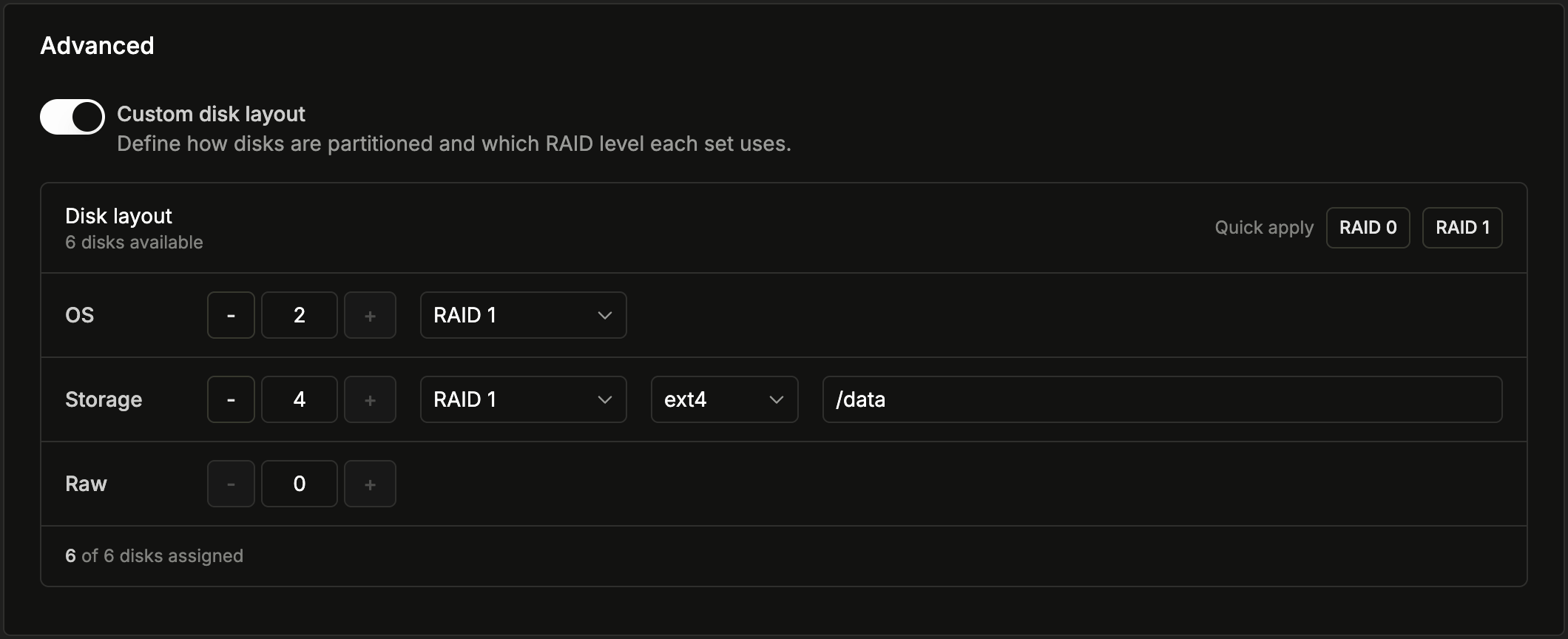
Enable Custom disk layout to split your server’s disks into up to three groups, each with its own role:- Each group’s RAID level can be No RAID, RAID 0, or RAID 1. RAID 0 and RAID 1 require at least two disks within that group.
- The Storage group is formatted with the filesystem
ext4and mounted at the mount point you choose, which defaults to/data. - Use Quick apply to fill the entire layout with a sensible default at a single RAID level (see Default configuration).
disk_layout array to the create server and reinstall endpoints. Each entry sets a role (os, storage, or raw), a disk count, and — where applicable — a raid_level and mount_point.
For infrastructure-as-code workflows, the Latitude.sh Terraform provider supports custom disk layouts through the disk_layout attribute on a latitudesh_server resource. Each disk group accepts the same fields as the API — a role, a disk count, and, where applicable, a raid_level and mount_point. The disk_layout attribute is mutually exclusive with the simpler raid attribute, and changing it triggers a reinstall, so the server must allow reinstalls. See the provider documentation for the full attribute schema.
Default configuration
When you apply a simple RAID level — either with Quick apply in the custom disk layout editor, or by deploying without customizing the layout — disks are grouped automatically based on how many the server has:
You can fine-tune any of these defaults in the custom disk layout editor before deploying or reinstalling.