> ## Documentation Index
> Fetch the complete documentation index at: https://www.latitude.sh/docs/llms.txt
> Use this file to discover all available pages before exploring further.
# Global Gateway
> Private connections between Latitude.sh locations
Global Gateway provides private, high-speed connections between Latitude.sh locations worldwide. Transfer data between your servers across different regions privately with enterprise-grade reliability.
## Benefits
* **Private network connections**: Direct, secure connections between datacenters
* **No additional costs**: No additional costs for data transfer between locations
* **Low latency routing**: Optimized paths for faster data transfer
* **Enterprise reliability**: Built on redundant, carrier-grade infrastructure
## How it works
Global Gateway routes traffic between your servers' Latitude.sh-assigned public IPs through our private backbone instead of the public internet. This is enabled by default for all customers, so servers in different regions can communicate securely over this backbone without any additional setup.
The default Global Gateway applies to traffic between **Latitude.sh-assigned public IPs** only. It does not extend [private networks (VLANs)](/docs/networking/private-networks) across regions. Private networks operate within a single location. If you need private network (VLAN) connectivity across multiple locations, you can request a [dedicated Global Gateway connection](#requesting-dedicated-connections).
## Default vs. dedicated connections
| Feature | Default Global Gateway | Dedicated Global Gateway |
| ------------- | -------------------------------------------- | -------------------------------------------- |
| Scope | Public IPs assigned by Latitude.sh | Private networks (VLANs) across regions |
| Setup | Enabled automatically | Requested through the dashboard |
| Configuration | No setup required | Custom bandwidth and routing |
| Use case | General cross-region traffic over public IPs | Private L2/L3 connectivity between locations |
## Active connections
View active Global Gateway connections in the [Global Gateway dashboard](https://www.latitude.sh/dashboard/interconnection/global-gateway). The dashboard shows bandwidth, latency, and network paths for all interconnections between Latitude.sh regions.
Default connections are active for all customers and update automatically as new interconnections become available.
## Getting started
Simply deploy servers in connected regions and traffic between their Latitude.sh-assigned public IPs will automatically route through the Global Gateway backbone. No additional configuration is required.
To view active interconnections and monitor performance, visit the [Global Gateway dashboard](https://www.latitude.sh/dashboard/interconnection/global-gateway).
 ## Requesting dedicated connections
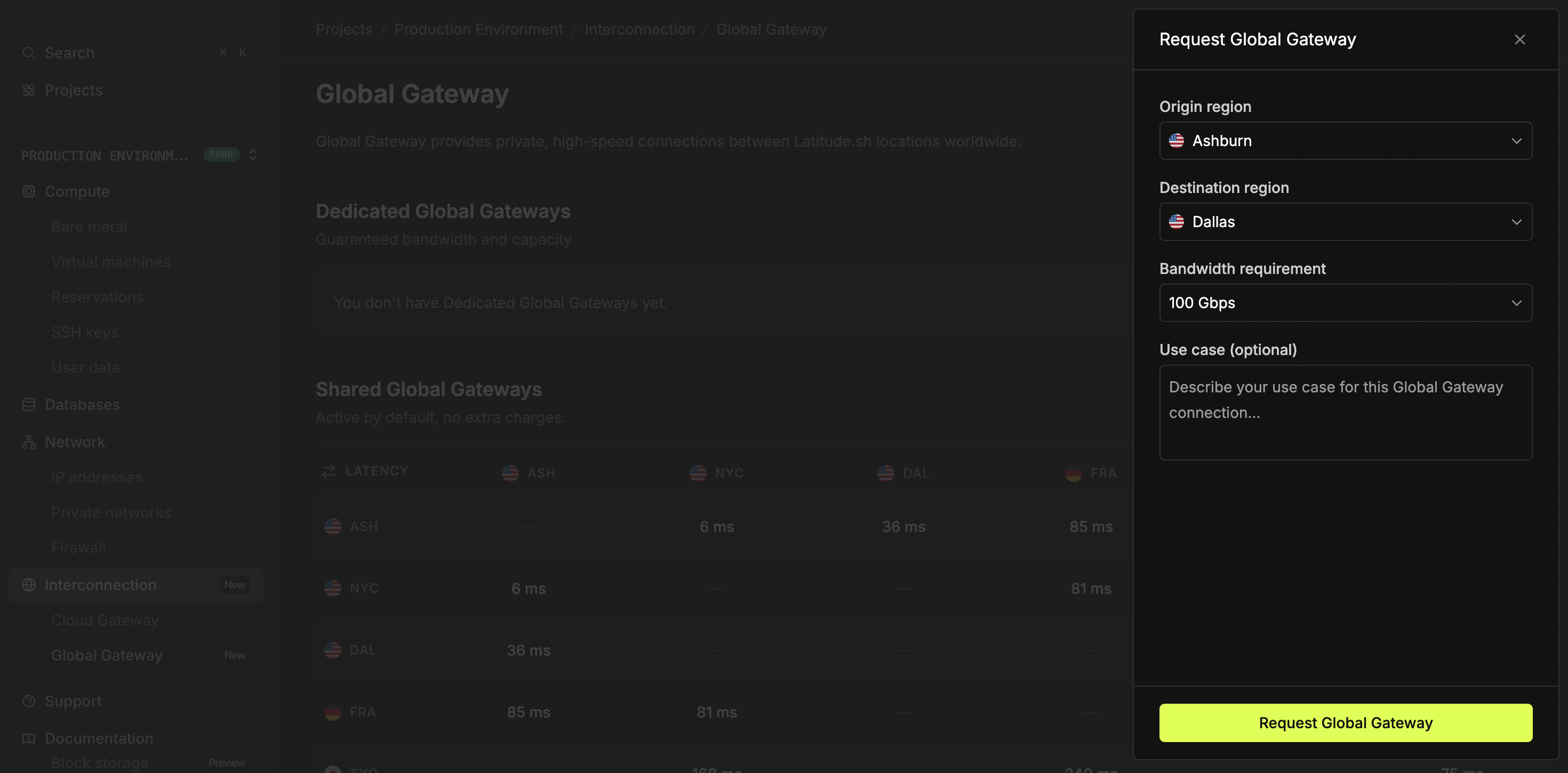
For cross-region private network (VLAN) connectivity, or for higher bandwidth requirements, you can request dedicated Global Gateway connections through the dashboard:
1. Log in to the [dashboard](https://www.latitude.sh/dashboard) and select a project
2. Navigate to **Interconnection > Global Gateway** in the sidebar
3. Click **Request dedicated connection**
4. Select your origin and destination regions
5. Choose your required bandwidth (1 Gbps to 100 Gbps available)
6. Describe your use case and submit the request
The team will review your request and configure the dedicated connection.
## Use cases
* **Multi-region applications**: Deploy distributed applications across regions without egress costs
* **Data replication**: Sync databases and storage between locations
* **Disaster recovery**: Maintain backup systems in different regions
* **Load balancing**: Distribute traffic across multiple datacenters
* **Hybrid cloud**: Connect cloud resources to bare metal infrastructure
* **Cross-region private networks**: Connect private VLANs across locations using a dedicated connection
## Billing
Default Global Gateway usage is included at no additional cost. Data transfer between connected regions through Global Gateway does not incur egress charges. Dedicated connections may have additional charges, contact [support](https://www.latitude.sh/dashboard/support) for pricing details.
## Requesting dedicated connections
For cross-region private network (VLAN) connectivity, or for higher bandwidth requirements, you can request dedicated Global Gateway connections through the dashboard:
1. Log in to the [dashboard](https://www.latitude.sh/dashboard) and select a project
2. Navigate to **Interconnection > Global Gateway** in the sidebar
3. Click **Request dedicated connection**
4. Select your origin and destination regions
5. Choose your required bandwidth (1 Gbps to 100 Gbps available)
6. Describe your use case and submit the request
The team will review your request and configure the dedicated connection.
## Use cases
* **Multi-region applications**: Deploy distributed applications across regions without egress costs
* **Data replication**: Sync databases and storage between locations
* **Disaster recovery**: Maintain backup systems in different regions
* **Load balancing**: Distribute traffic across multiple datacenters
* **Hybrid cloud**: Connect cloud resources to bare metal infrastructure
* **Cross-region private networks**: Connect private VLANs across locations using a dedicated connection
## Billing
Default Global Gateway usage is included at no additional cost. Data transfer between connected regions through Global Gateway does not incur egress charges. Dedicated connections may have additional charges, contact [support](https://www.latitude.sh/dashboard/support) for pricing details.